Create useful digital products
Explore formats such as ebooks, planners, templates and practical guides.

A step-by-step, action-focused guide to help you find an idea, create a digital product with AI, set up payments and start promoting it online — even if you're a beginner.

Digital products can include useful knowledge, tools and resources delivered as downloadable files. This guide walks you through the first steps of building and promoting one.
Explore formats such as ebooks, planners, templates and practical guides.
Use prompts to brainstorm ideas, structure content and speed up product creation.
Understand how Reels, automated conversations and Meta Ads can help reach potential buyers.
Follow the sequence described on the product page — from idea to product, payment link and promotion.
Explore ideas people may actually want.
Check demand before spending time creating.
Use AI prompts to create your PDF product faster.
Turn your content into a professional digital product.
Learn how to set up your product page.
Prepare a link customers can use to purchase.
Learn how to use Instagram Reels and content to introduce your digital product, build interest and bring potential buyers to your page.
Understand the basics of promoting your offer with paid Meta advertising, alongside comment automation and follow-up conversations.
These are genuine SuperProfile interface examples from its public help and product materials. They illustrate the platform workflow, not your personal account or earnings.

SuperProfile's product creation interface includes an option to sell digital files such as ebooks and PDF templates.

Preview the payment page and configure supported checkout options before sharing the link.

The platform's payment settings show payment setup and supported methods for eligible Indian creators.
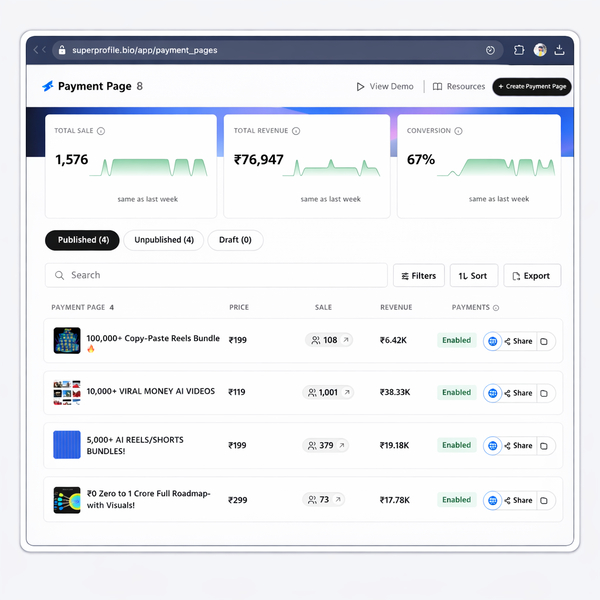
Example of a payment-page dashboard. Figures shown in this sample image are not claims about this guide or its buyers.
Platform interface references: SuperProfile digital product setup guide · SuperProfile digital products.
The guide introduces both organic promotion and paid advertising, so you can understand different ways to bring potential customers to your digital product.
Promote without paying for ad placements. Use useful content and Instagram Reels to introduce your product, demonstrate its value and attract people who may be interested.
Use Meta Ads to put your offer in front of a selected audience. Learn the basic process of turning an ad creative into visits and potential purchases.
Instead of collecting disconnected tips, follow a focused sequence and work toward creating something you can offer online.
The guide teaches a process; financial and lifestyle outcomes depend on your product, demand, pricing, marketing, effort and costs.
Learn a digital workflow you can practise from home with a computer or smartphone.
Package useful ideas, skills or resources into a downloadable format.
Understand ways to reach potential customers and test what works.
Illustrative possibilities, not promised outcomes. Buying this guide does not guarantee sales, revenue, profit, financial independence or a lifestyle change. Results vary and may require additional tools, advertising spend and ongoing work.
Learn the process. Use the prompts. Follow the steps. Build at your own pace.
The guide is designed to help beginners follow a practical sequence. You should still be prepared to practise and implement the steps.
No coding skills are required for the process described in the guide.
The guide covers organic promotion through Instagram Reels and content, as well as paid promotion basics using Meta Ads. It also introduces comment automation and follow-up conversations. Paid advertising spend is separate from the ₹99 guide price.
You can explore organic promotion without paying for ad placements. If you choose to run Meta Ads, you will need a separate advertising budget. The ₹99 purchase is for the guide, not an advertising credit.
No income is guaranteed. Sales depend on the product, market demand, pricing, promotion, costs and execution.
Click a Get the Guide button to visit the product page and follow the checkout or access instructions shown there.
The linked product page currently displays “Free” publicly. Confirm that the live checkout reflects your intended ₹99 offer before running ads.
